Managers#
This chapter is for whoever decides what gets done, answers for what it cost and runs the meetings where both are settled. It assumes Developers: the states, the roles, the clock and the deadlines are described there, and here they are used.
Four things live in this chapter: work that comes back on a schedule, the standing meeting, the plan and what it tells you, and the money – work packages, timesheets and what you may and may not do with them.
Running a project#
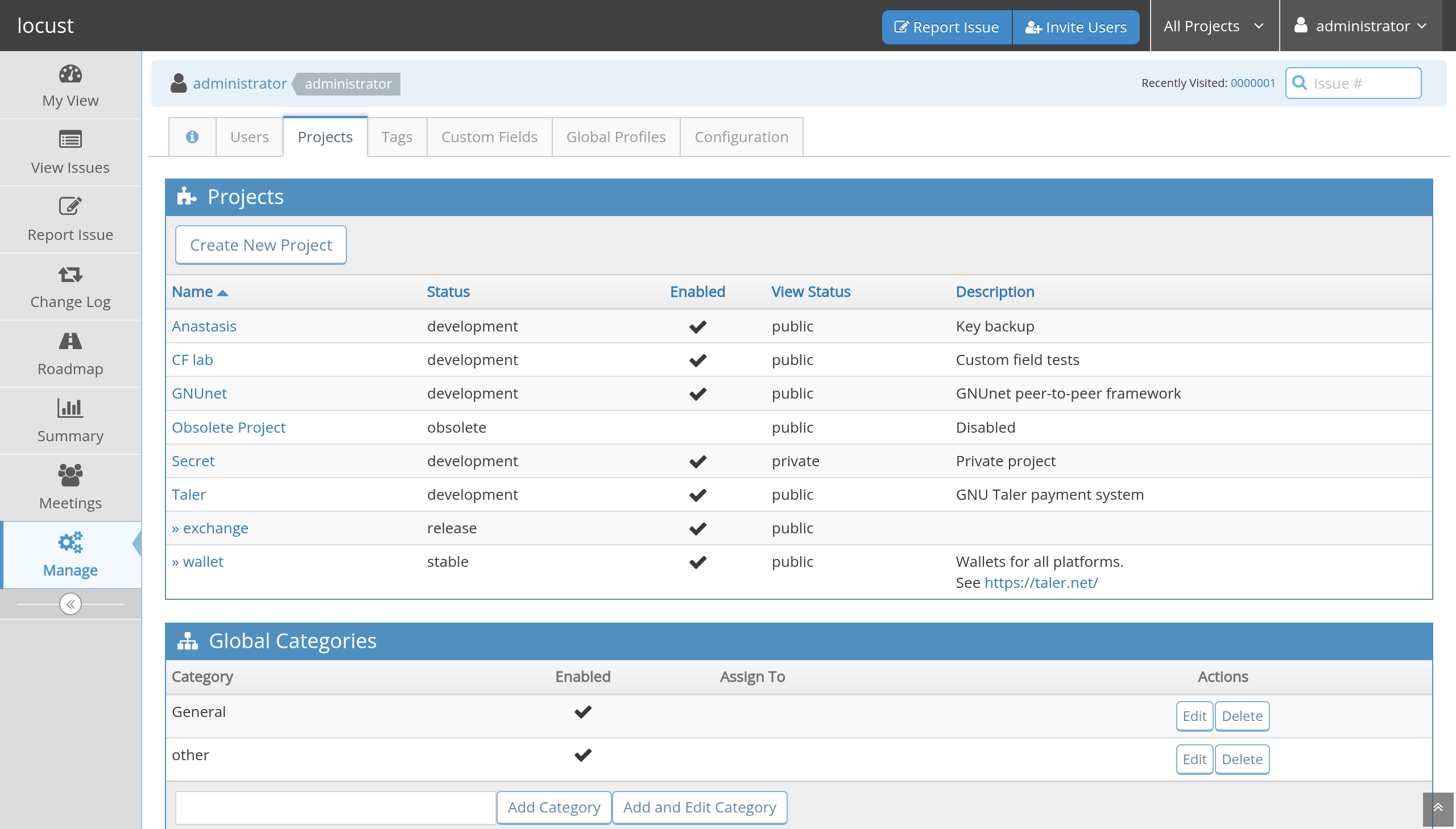
Figure 18 Manage: the projects, their status and who is in them.#
A project is administered in tabs. Under the administration bar
(Users, Projects, Tags, …) comes the project’s name, and under that the
project’s own bar: Edit Project, Categories, Versions, Periodic
Tasks, Jour fixes, and Work packages where the project runs the
compliance process. The first bar is the installation, the second is
this project, and the name between them says which project you are in.
Edit Project is the project itself – name, status, visibility,
description, the subprojects, the custom-field links and the
membership – with locust’s own settings beside MantisBT’s. The lists
that are their own kind of work are the other tabs, and adding a
category or a version returns to the tab it belongs to.
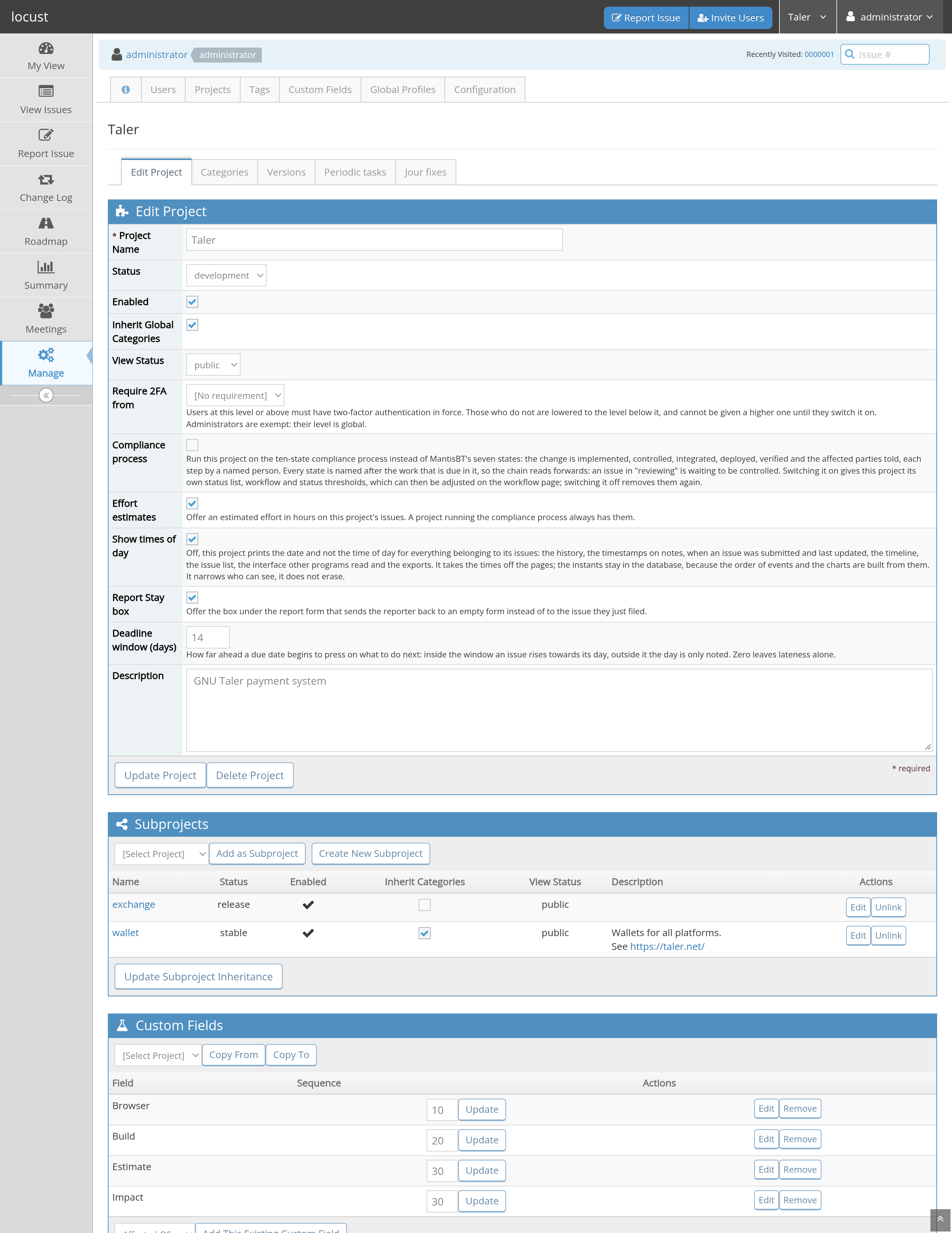
Figure 19 A project’s settings: MantisBT’s above, locust’s own below.#
The ones that change how the project works:
Compliance processRun the project on the ten-state process with its four roles instead of MantisBT’s seven statuses. This is the switch everything else in Developers hangs off. It can be turned on for one project and left off for the rest.
Verifier is not the implementerBesides the control, which somebody other than the implementer always does, also require that the verification is somebody else’s.
Default communicatorA new issue of this project starts with this person as its communicator, so the field is filled from the beginning.
Allow fast-trackLet an issue of trivial or text severity skip the control, the release and the deployment. See Developers; note that in a compliance project, lowering an existing issue’s severity into that range is deliberately the management’s decision alone.
Effort estimatesOffer an estimated effort in hours on this project’s issues. A compliance project always has them; a plain project can have them, and without them the Gantt has nothing to draw.
Deadline window (days)How far ahead a due date begins to press on what to do next. Fourteen by default; zero leaves lateness to speak for itself.
Report Stay boxWhether the report form offers the box that sends a reporter back to an empty form.
Require 2FA fromThe access level from which members must have two-factor authentication in force. Setting it lowers the stored level of members who have none, until they set it up; they cannot be promoted back meanwhile. An administrator can deactivate a lost device’s requirement (Administrators).
Classify before workingNobody starts work on an issue of this project without a work package. See Work packages and budgets.
What the process adds in the GanttThe shares the Gantt adds to an estimate for the steps the estimate does not include: control, verification, deployment, release and communication. The defaults are 15, 15, 5, 5 and 5 per cent.
A simpler report form is not a switch but a list: the project’s
bug_report_page_fields says which optional fields the report form
shows, and a project that drops priority, platform, OS, handler and
target version from it asks a newcomer for four things instead of a
dozen. An administrator sets it (Administrators); the fields it
hides take their defaults on submission.
Work that comes back#
The backup check every week. The restore test every quarter. The year-end closing. Filing those by hand means remembering them, and a tracker whose point is that nothing is forgotten should not depend on somebody’s memory.
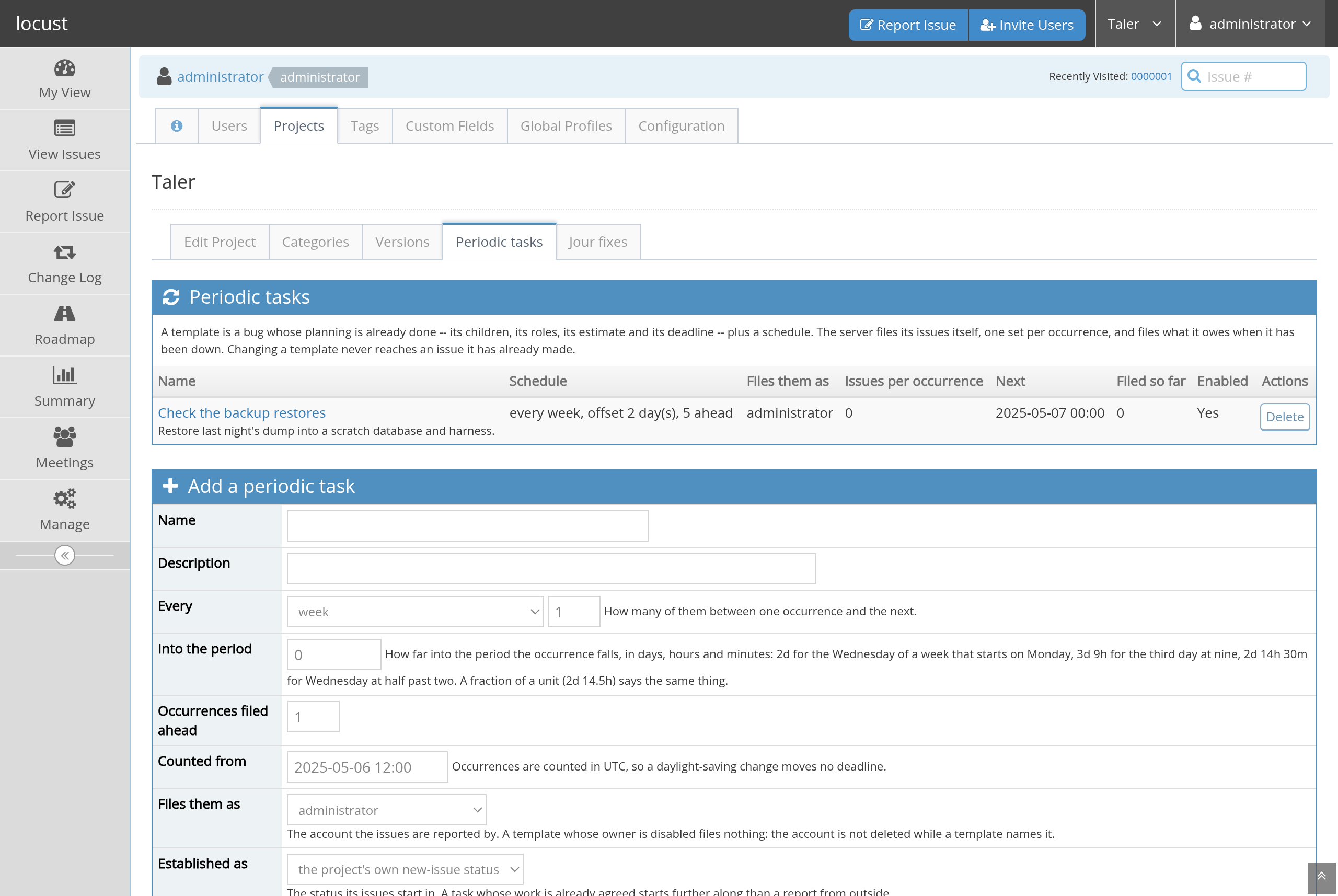
Figure 20 Periodic tasks: a template, a schedule, and what each one has filed.#
A periodic task is a template plus a schedule. The template is a bug whose planning is already done: its children, its roles, its estimate, its deadline, its tags. Every person field of a template may be left empty, and starts that way – a template that files a quarterly report with a reviewer, a verifier and a release manager nobody chose is a template that files four wrong decisions a year, so the roles a template does not know are named when the work gets there. The template’s owner is the exception: it reports everything the template files, so it must be somebody. The schedule is three numbers:
- Every
The period: hour, day, week, month, quarter or year, with “how many of them” beside it. A task with no frequency is filed on demand – which is what an agenda template for a jour fixe is.
The list of a project’s tasks offers Delete on a task that has filed
nothing. A task that has filed something cannot be deleted – the
issues it filed must keep saying where they came from – and says how
many instead; switch it off to stop it filing more.
- Into the period
How far into the period the occurrence falls, as whole days and hours.
2dis the Wednesday of a weekly task;2d 14his Wednesday at two.- Occurrences filed ahead
How far in advance the issues appear. Five weeks ahead means the team can see and plan what is coming rather than discovering it on the day.
Beside them: the account the issues are filed as (a disabled account
files nothing, and the page says so), and the status they are
established as – a task whose work is already agreed can start at
acknowledged rather than new.
Each occurrence files the template’s issues, with the deadline each node
carries relative to the occurrence (5d after it, say). The template
keeps the list of everything it has filed, and the issues themselves say
which task they came from. Switching a task off stops the filing and
removes nothing; a task that has already filed issues is not deleted for
that reason. Withdrawing one offers to close the untouched future
issues it left behind.
The filing is done by the server itself – there is no cron entry to set up and nothing to forget on a new machine – and it is claimed per occurrence, so two servers against one database, a restart or a clock that jumps cannot file one Wednesday twice.
Meetings#
Work is discussed before it is done, and that discussion is where half the decisions a tracker records are actually taken. A meeting here is not a calendar entry with a tracker beside it: its agenda is issues, its invitees are accounts, its minutes are notes, and its hour goes on somebody’s timesheet like any other hour.
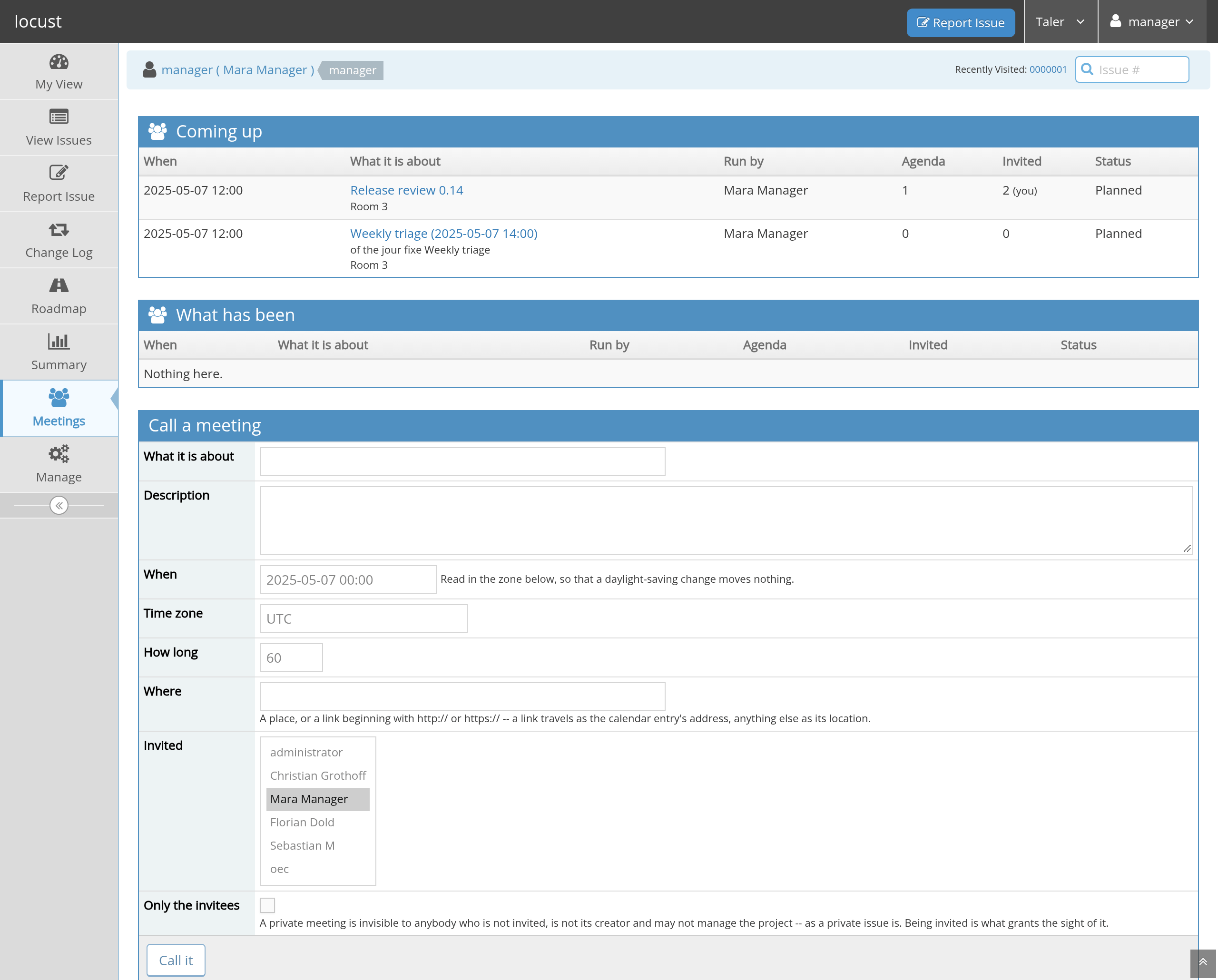
Figure 21 Meetings: what is coming up, and what has been.#
Meetings is in the menu of every page, beside Summary and
Roadmap, as soon as the installation holds one meeting; a tracker
whose projects never meet never shows the entry. My View also opens
with the next few meetings you are in, how many days off each is and
whether it has an agenda yet.
Calling one#
A developer of the project may call a meeting: what it is about, when it
starts, how long it lasts, where (a room, or a link beginning with
http:// or https://, which travels as the calendar entry’s URL),
in which time zone – read in that zone, so a daylight-saving change
moves nothing – and who is invited, from the project’s members. A
meeting can be marked private, and is then invisible to anybody who is
not invited.
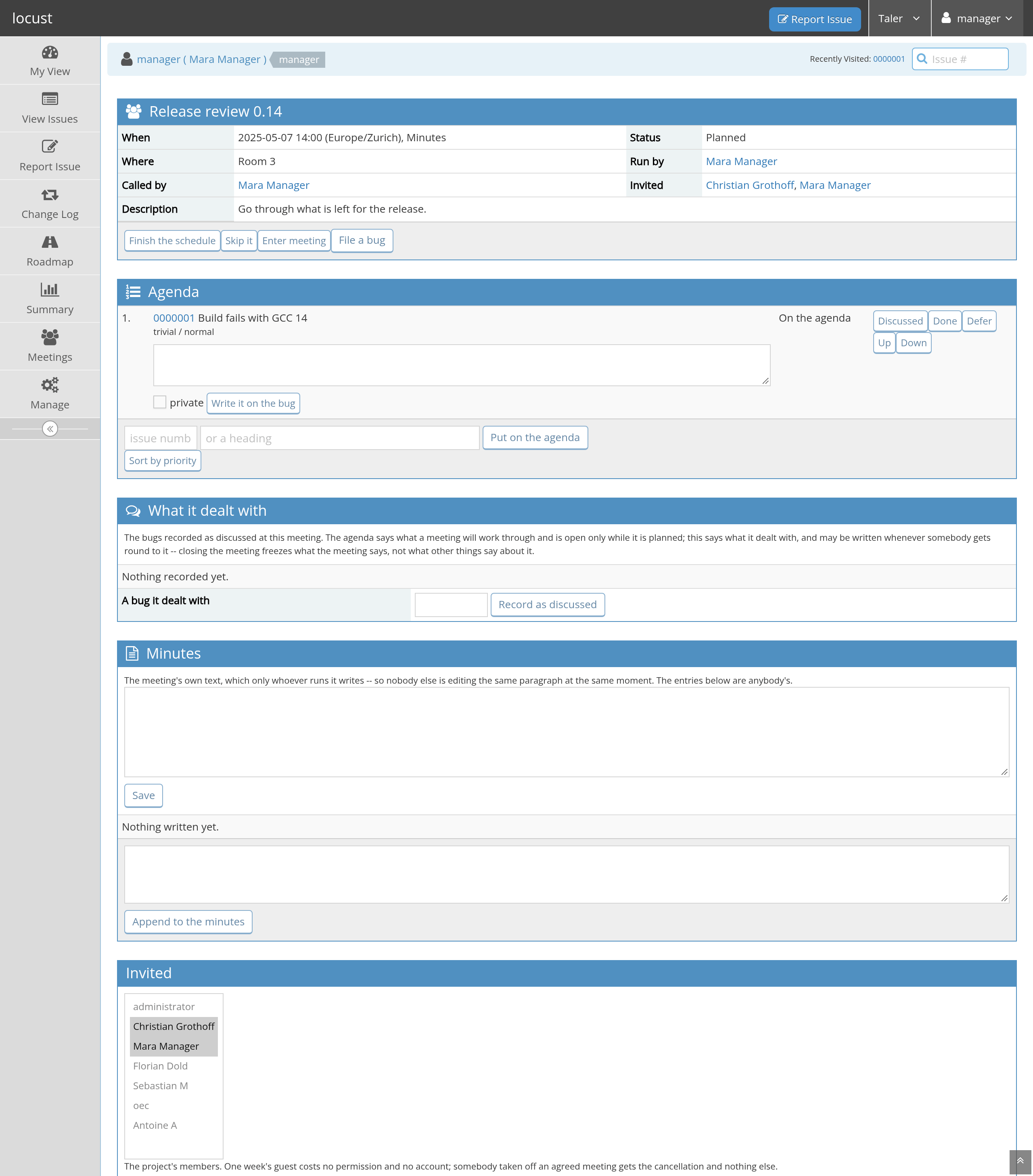
Figure 22 One meeting: the appointment, the agenda, the minutes, the invitees.#
The agenda#
An ordered list of items. An item is an issue or a heading. Anybody
who may see the meeting can propose an issue for it – Discuss at a
meeting on the issue itself, or the box on the meeting page – and
whoever runs the meeting puts it on the agenda, rejects it or defers it
to the next one. Sort by priority orders what is on it the way the
priority queue would.
Discuss at a meeting leads to every meeting of the project you can
see, and does two different things there. A meeting that is still
being arranged takes the issue as a proposal for its agenda. Any
meeting at all – including one closed weeks ago – takes the issue as
a record that it was discussed (Record as discussed), which is
what you want when you are writing up afterwards what was settled
where. The issue then names every meeting it is bound to and says
what each one is to it: the meeting it came out of, the meetings whose
agenda it is on, and the meetings it was discussed at. Recording it
needs no more than the right to update that issue, and taking the
record back is the same button again; the meeting’s page lists the
same bugs under What it dealt with.
Finish the schedule ends the arranging: every invitee is mailed the
agenda, with a link per issue and the calendar entry attached. Reopening
the agenda is possible and mails the change.
Skip it cancels one occurrence with a reason: the invitees are told
and every item on it moves to the next meeting rather than being lost.
A meeting with nothing on its agenda reminds whoever runs it, once when it comes inside the reminder window (seven days by default) and then daily on the last day.
Holding it#
Enter meeting starts your clock on the meeting – it is work, and it
is charged like work, to the package the meeting names. Leave meeting
stops it. The meeting itself keeps no record of who was there or for
how long: the run is the person’s, the confirmation is the person’s, and
the record is their sheet’s.
While it runs, any invitee may mark an item Discussed, Done or
Defer. That is how minutes actually get written: by the room, as it
goes, rather than by one person afterwards.
The minutes are entries anybody present may append, plus one main note
that only whoever runs the meeting writes, so two people are never
editing the same paragraph. An entry about an issue on the agenda can
be written onto the issue: it becomes an ordinary note there,
marked as written in this meeting, so the decision lives with the work
and not only in the minutes. File a bug opens the report form for
something the meeting turned up, and the new issue is recorded as having
come out of it.
Close the meeting makes the minutes and the outcomes final.
The standing meeting#
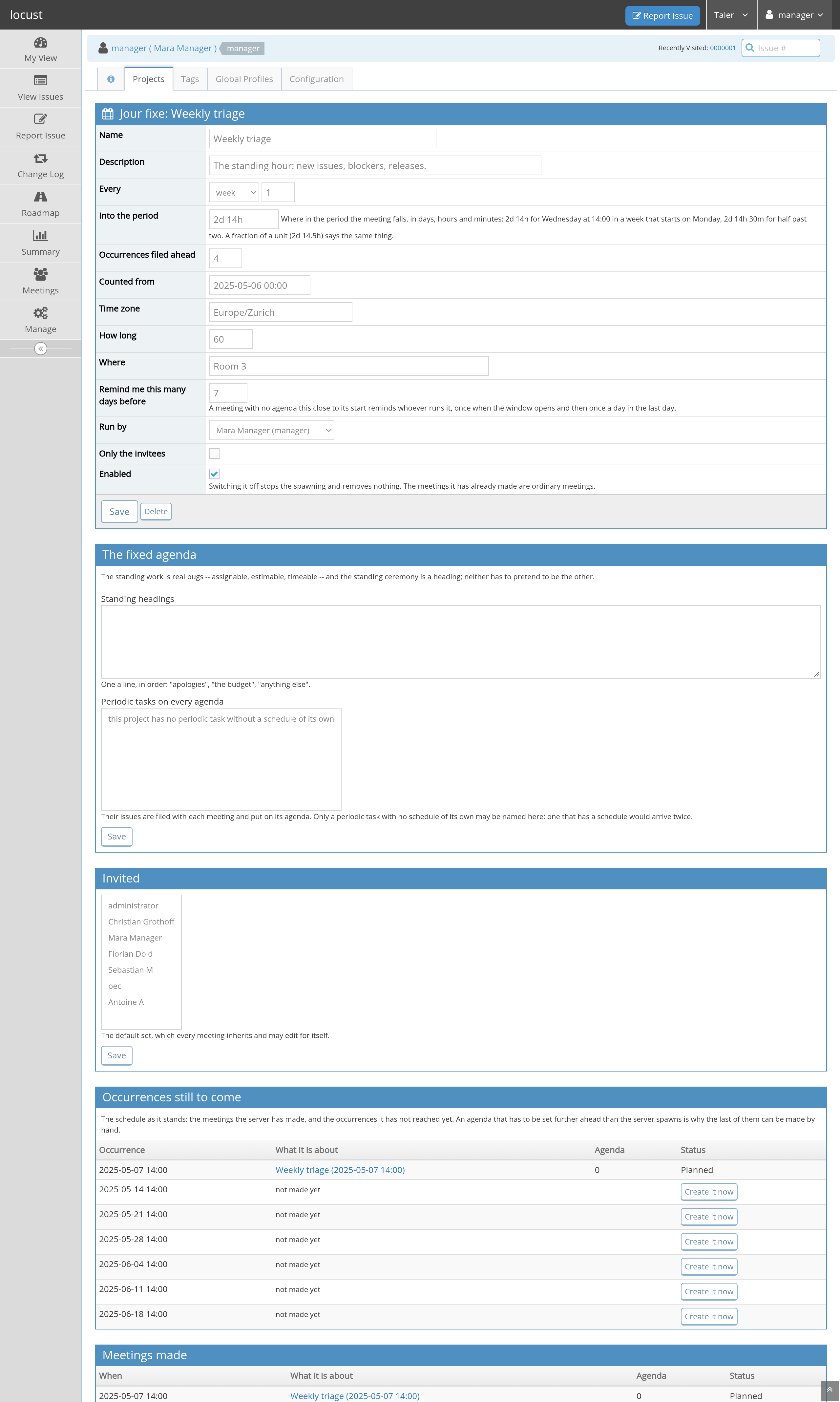
Figure 23 A jour fixe: the schedule, the fixed agenda, the default invitees, and the meetings it has made.#
A jour fixe is a standing appointment, and its schedule is the
periodic tasks’ schedule – the same period, the same offset, the same
“how many in advance”. “Every Wednesday at 14:00, four meetings ahead”
is week, 1, 2d 14h, 4; half past two is 2d 14h 30m, and
2d 14.5h says the same thing. The server makes the meetings; each
one inherits the definition’s time, place, duration, responsible
person, invitees and private flag, and may change any of them for
itself.
Occurrences still to come is the schedule as it stands, a little
further ahead than the server works to: the occurrences that have
meetings are links to them, with their state and how much is on each
agenda, and the ones the server has not reached yet say so and offer
Create it now. Pressing that makes exactly the meeting the server
would have made on the day – same invitees, same headings, same
checklists – which is how an agenda gets set further ahead than the
spawn-ahead reaches. Pressing it twice makes one meeting.
Its agenda is fixed in two ways that do not pretend to be each other:
Standing headings: a line each, in order – “apologies”, “the budget”, “anything else”.
Periodic tasks on every agenda: tasks without a schedule of their own, whose issues are filed with each meeting and put on its agenda. These are real bugs – assignable, estimable, timeable – not headings, which is what makes “we always go through the open releases” a piece of work somebody can be held to rather than a line in a document.
Items deferred when no next meeting existed yet wait on the definition and are put on the next meeting the server makes.
The plan#
The Summary menu has five tabs, and the summary’s filter applies to
all of them: every bar, slice and band is a link into the issue list it
counts.
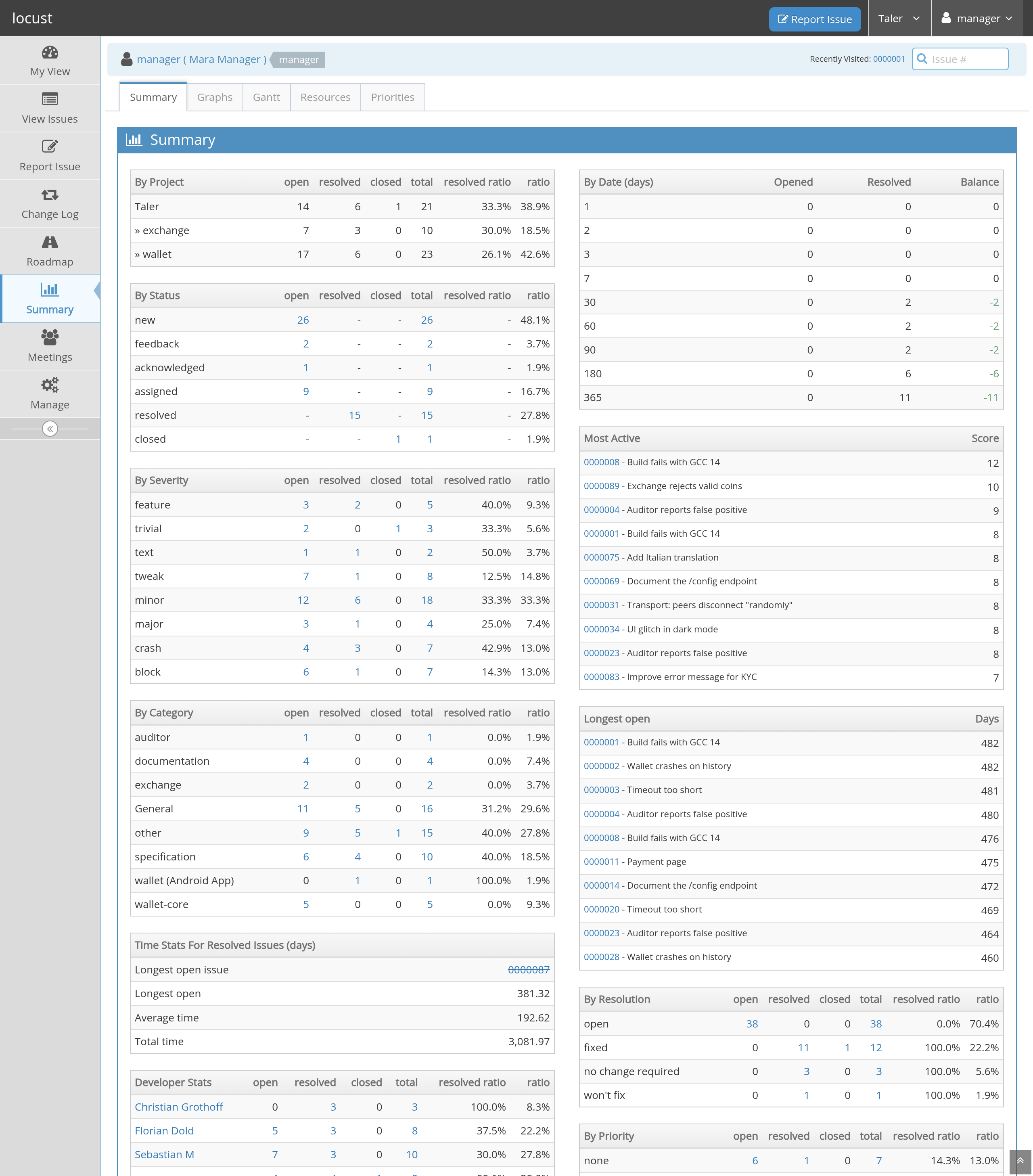
Figure 24 Summary: MantisBT’s counts, by every field an issue has.#
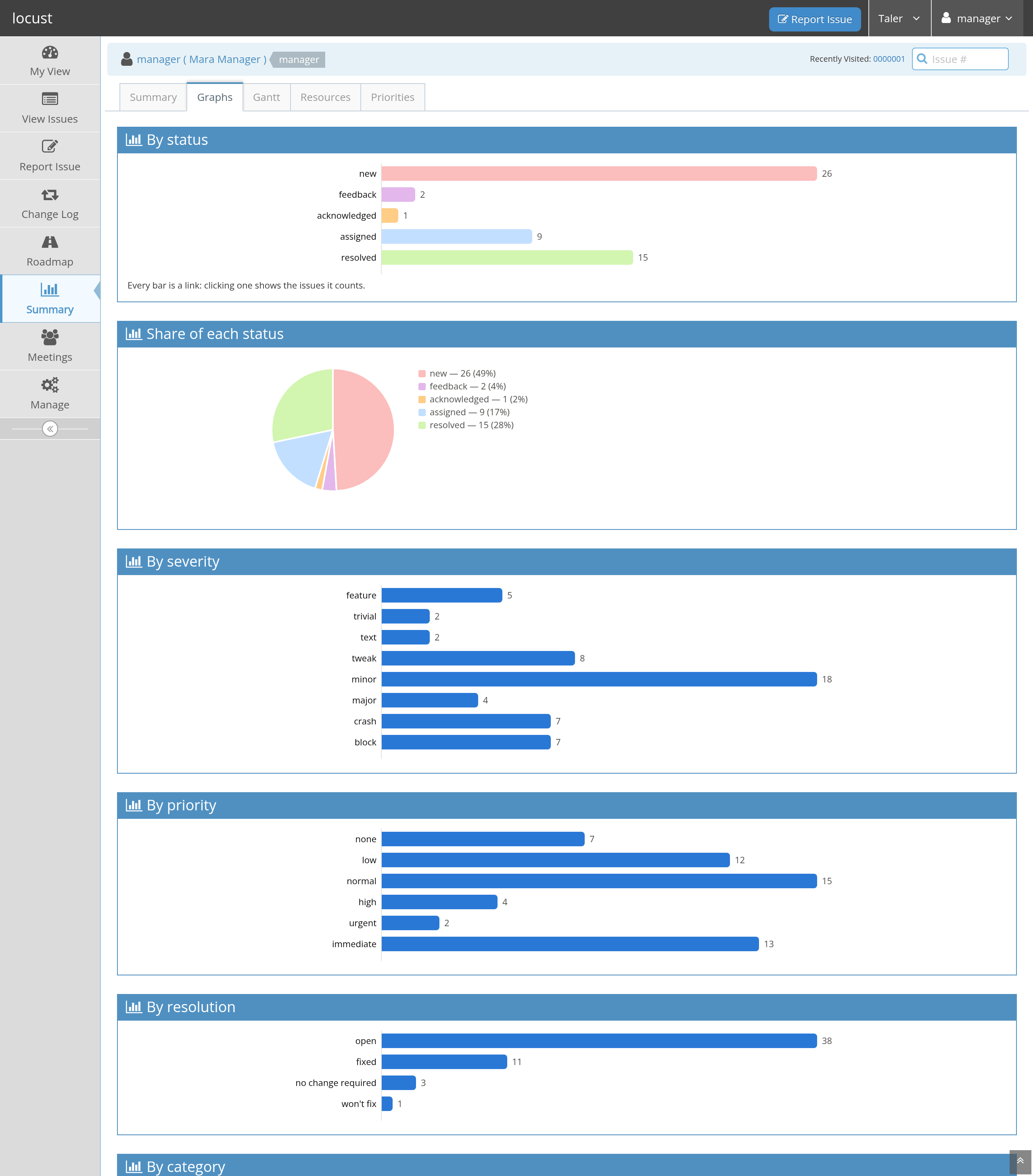
Figure 25 Graphs: breakdowns, the trend, where the backlog sits, how long
issues stay in a status, and estimates against recorded effort.#
Graphs draws what the issues’ own history already knows, so it works
on data imported from before locust: opened against closed per period
with the backlog as a line, how many issues stood in each status at the
end of each period, the median days an issue spends in each status of
the project (every one of them, with zero where nothing has been
measured yet), and –
where a project estimates – how far the effort recorded against
resolved issues missed their estimate. The last one is for making
estimates better; it is not a scoreboard.
The breakdowns – by status, severity, priority, resolution, category
and developer – count the issues that are not closed. A tracker
that has been open for eight years has more closed issues than open
ones, and a bar that counts them says what the project used to be.
Three charts are exceptions and each has a reason: “Opened and closed”
and the estimate chart are about what was finished and would measure
nothing without them, “Where the backlog sits” is about the past (an
issue closed today was genuinely open last March), and By target
release counts them because a release’s record is what it carried.
That last one says so in a line of its own, and its rows read newest
release first, as a roadmap does.
Both tabs are drawn from one statement whose answer is kept for a day, so the second look at either is free; any write anywhere throws that away, so what the day covers is a day passing and not a change.
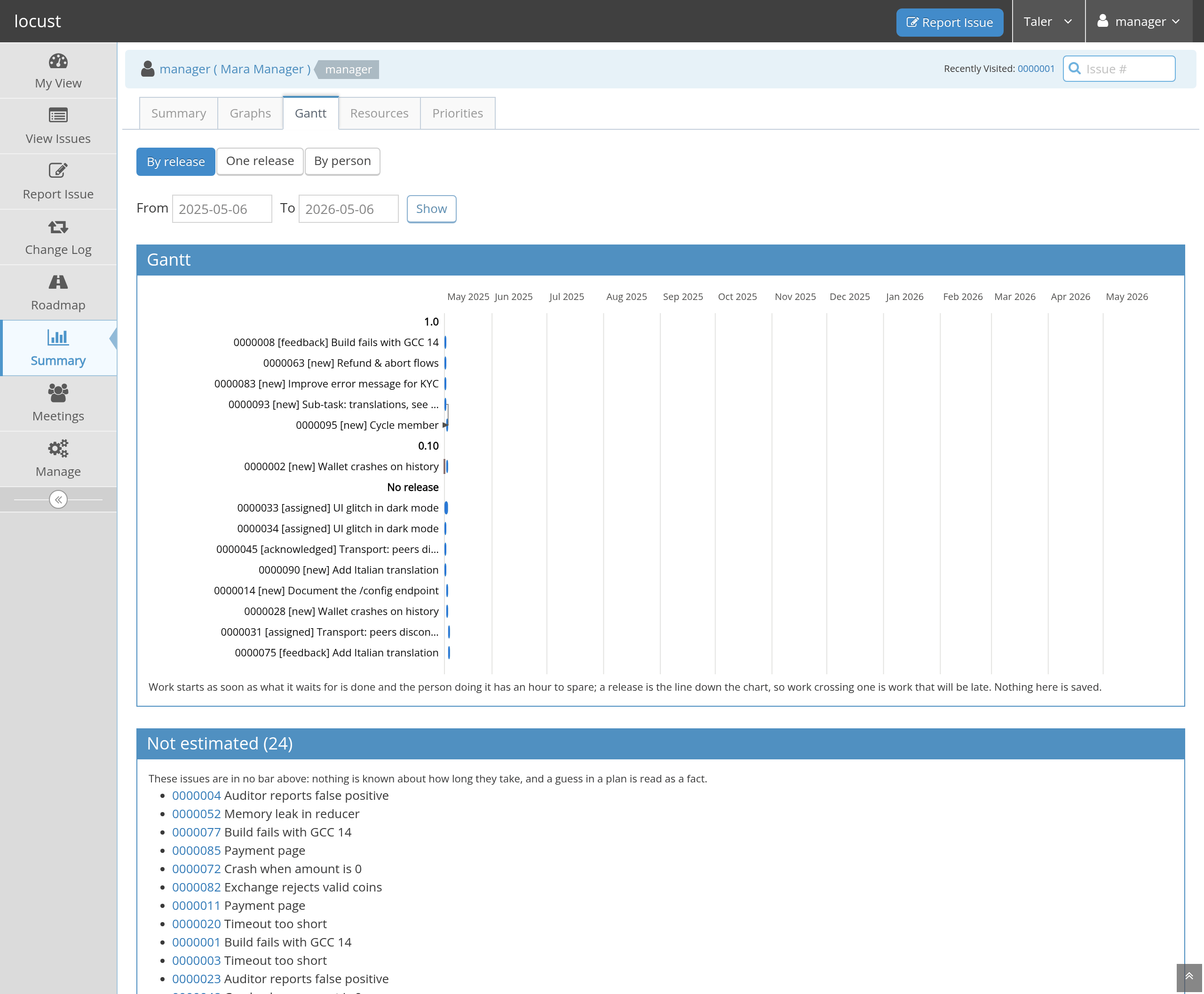
Figure 26 Gantt: the schedule that follows from the estimates, the
dependencies, the deadlines and people’s real availability.#
Gantt schedules forward from today. An issue starts as early as its
children allow and as early as the person doing it has an hour to
spare; a release is a line down the chart, so work crossing one is work
that will be late, and a deadline is a mark in the issue’s own band.
Three views: by release, one release, or one row per person. Nothing
here is saved – it is what follows from the issues as they stand.
The chart covers today to a year from today unless you say
otherwise in the two date fields; one release covers today to that
release’s own date, so a bar touching the right-hand frame is a
release that will not be made. The window clips the drawing and not
the schedule: the dates, the dependencies and the pile-ups are the
same whatever you ask to see, and a bar cut by the frame is drawn with
a square end to say that the work continues.
Issues without an estimate are drawn in no bar and listed beneath with a link to them. That is the honest answer: a guess in a plan is read as a fact, so the plan says what it does not know instead.
In a compliance project the bar is longer than the estimate, because the estimate is the implementation and the process also costs control, verification, deployment, release and communication. Those shares are the project’s setting, drawn in a second colour.
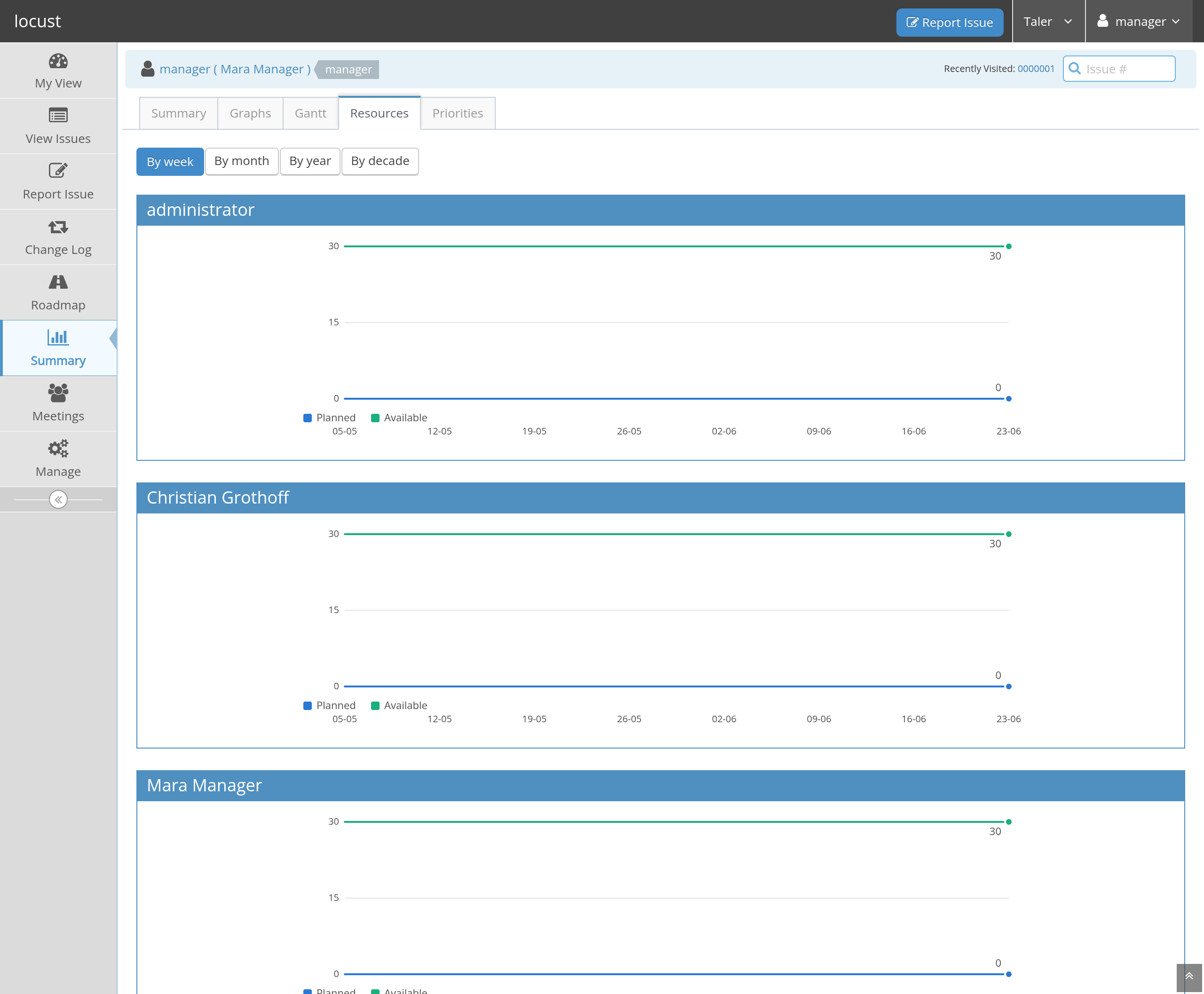
Figure 27 Resources: planned hours against capacity, per person per week,
with the work nobody is named for in a lane of its own.#
Resources is the same schedule read the other way: per person per
week, planned against available, with the overshoot in its own colour
and a column for the hours the plan needs that no calendar carries.
Priorities is the per-person queue with its reasons (Developers);
you can open a member’s from the project’s user list.
Capacity comes from four layers, each overriding the last: an
installation default of hours per working day, the project’s hours per
person, each person’s own working weekdays, and the days that differ –
leave, public holidays, half days. People keep their own weekdays and
absences in their Availability tab, because only they know them; you
set what a person gives this project out of their day.
Work packages and budgets#
A work package is the contract or grant that hours are charged to:
one name an auditor and a developer read the same way
(HORIZON-101234-WP2-Integration), with the granted hours, the dates
it runs between, and whether it is still open.
An issue carries its packages – a checkbox each; anyone who may update the issue may set them. The same bug is often one package for one person and another for the next, because what a funder paid for is the person’s time and not the bug. A meeting carries them the same way.
Who may book to iton each package is the people whose time may be booked to it. Nobody named means every member of the project, which is what every package starts as, so an installation that has not thought about eligibility behaves exactly as it did. Somebody who has since left the project stays on the list and is said to be gone: the list is a record of who was engaged, not a copy of the membership.Eligibility governs the booking, and nothing else. A reviewer who is on none of an issue’s packages may still review it and you may still ask them to; what they cannot do is run a clock on it, and the refusal tells them to ask you.
A record keeps the package it was confirmed against, and nothing moves it afterwards. A run divided between two packages writes one record per package per day; the day’s records add up to the day to the minute.
A project that cannot afford unclassified hours sets
Classify before
working
: then taking an issue up asks for the package first, and says which of the two things is missing – nobody has classified the work, or nobody engaged you on it.Activity types are timed work that is no issue – a meeting, administration, training – with their own package per run, chosen from the ones that person may book to.
Switching a package off stops new work on it and removes nothing, and asks for how many whole years its records must still be kept. When that time is up the package appears on the list of packages due for deletion; deleting one deletes the records booked against it, which is the one operation that changes a sheet that has been signed.
The timesheet (Developers) shows the hours per package per day with what is left of each budget. A developer submits a month; you approve it. Anything that changes in a submitted month makes the submission stale, and it must be submitted again – that is what a signature on a document means.
Reporting to a funder#
A grant does not only want the hours to exist; it wants them in an
inbox every month. Each work package therefore has a Reporting page
of its own, reached from its row on the Work packages tab, with a
schedule (monthly, quarterly or yearly, every n of them, counted from
a day you give), the addresses the report goes to, what is waiting and
what has been sent.
What the funder receives is the period, the package’s full name, the hours booked to it in the period, the hours since it began, the granted budget and what is left – as a plain-text table and the same figures attached as a spreadsheet. No person, no issue, no day and no clock time are in it. That is why the address needs no vetting, why the data protection document needs no new version and why nobody has to be asked again; a funder whose template wants named effort is a decision to take deliberately, with that document rewritten and re-signed, and not a switch anybody flips.
A report waits until every timesheet month it reads has been submitted
and approved – a figure a funder files is a figure somebody has
signed for. The page says which periods are waiting and whose months
they are waiting for, and the people who owe a submission are reminded
when the window opens and weekly after that, as are you. Where one
person never submits, Release sends the period anyway: the mail says
it was released and that the months of n people were not approved –
a count and no names, because the recipient is outside the tracker –
and the release is one line in the audit log.
A correction after a report has gone out puts the period back: the next report of that period is marked a correction, carries the next sequence number and names the earlier mail’s date and the difference, because the recipient’s file wants a document that stands on its own. Nothing is ever sent twice for the same figure, and a server that was switched off for two months sends both months when it comes back.
What you may see, and what that costs#
A clock on a person is a monitoring system wherever it runs, and the tracker is built so that the decisions about it are visible rather than quiet:
A developer always sees their own sheet. A manager sees the totals of what they manage. Asking for the issue-by-issue detail of somebody’s month is recorded, and that person can see that you asked.
The whole manager’s view can be switched off for an installation (
timesheet_manager_view) – a works agreement may draw the line exactly there.The tracker never computes a utilisation percentage, never puts people side by side in a table, and never infers work from a commit, a login or an idle screen. Every number on a sheet is a clock somebody started and ended deliberately.
Before switching the ledger on, the obligations are real and are not the
tracker’s to discharge for you: co-determination where it applies,
telling each person before the measuring starts, and the written data
protection impact assessment that systematic monitoring of people at
work requires. docs/locust-legal.typ in the source tree is the
document locust ships for the second of those.
Reports and exports#
Any filtered list exports as CSV, Excel, a Word document or a print view;
Manage Columnsdecides the columns.A timesheet month exports as a monthly declaration (hours per work package, with the two signature blocks) or a daily grid, with issue numbers only if asked for.
The summary tabs are pages, not exports; the lists behind every bar are, because every bar is a link into the issue list.
Change LogandRoadmapare built from the fixed-in and target versions of issues, which makes them worth the discipline of setting those two fields.
What this tracker will not do#
Written down here so that the next feature has to argue against a decision rather than merely add a column:
No hours-per-developer table and no utilisation percentage.
No presence, idle or activity detection; no run started by a commit, a login or a window title; no screenshots.
No estimate that becomes a number in a plan without somebody standing behind it: unestimated work is listed as unestimated.